Saturday, October 1, 2011

Veronisoft IP Monitor

Veronisoft IP Monitor 1.4.1.5

Veronisoft IP Monitor 1.4.1.5 | 1.96 Mb

IP Monitor is a network monitoring software that allows you to verify the network connectivity of TCP/IP hosts on the Internet and LAN. The program periodically pings, or checks TCP ports on user specified computers or other network devices. Tool to lookup and find IP address and Host name information in the DNS (Domain Name System).

How to obtain full version IP Monitor.
Programs, which you can download from our site is a trial version. With the trial version, you can use for 15 days. If you want, use IP Monitor without limitation, you must buy License Key. Two types of license we provide for this software: A Single License is valid for a single person who uses the software personally on one or more computers (e.g. work PC, home PC, notebook, etc.), or it can be installed on one computer used non-simultaneously by multiple people. A Site License grants an organization rights to install and use the software on an unlimited number of computers within one organization site (e.g. an office or data center located at a single physical address).

System requirements.
IP Monitor require administrator privileges. For correct usage of IP Monitor you need to be connected to network with the correct configuration network. Ports which are checked with TCP Connect method cannot be protected (cleaned) with firewall.

How to work with IP Monitor?
Work with IP Monitor is very easy. Application main Dialog Box consist of left and right side boxes.

Left side corner is for moving and rotating the window. For rotation you need click on the incomplete circle on the top of the corner. Right side contains boxes. Each box is a connected to a IP. You can also change all these attributes: text, color, pictures and background color for both states .

Box Menu.
You can delete and add new boxes by right-mouse-click on choosen box. There you will see a menu which consist of: New Box, Edit Box, Delete Box.

New Box add new box, which will be connected with some IP in network. When you click on the box it will show focus. Focus, means that the box is bordered with white dashed-line. When you choose Delete Box, you can delete the box. When you choose New Box, it will create a new Box. Each box will appear on the right side.If you choose New Box or Edit Box it will show a window of Box Properties with some changes that Edit Box will edit values of existing boxes. Values are filled in and you can change it.

New Box or Edit Box.
In New Box or Edit Box you can set Skin wich are graphic image of Boxes. These boxes are user define. User can change: picture, background color, color of text. Setting of background color of boxes, which sets the background color of boxes when verify IP is online or offline. Pictures in New Box or Edit Box you can change with button Pictures. You can change picture for each status. Box text means the text in which you can see below the picture. Text will be without change for both states (online and offline) within it you can change text color.Text color of bouth states you can change with buttons Text Color. Most important is the net setting, must contain address of PC which you want check. Address must be IPv4 addresses of Computer, domain addresses or names of PC's in Microsoft Network sharing files and printers. The TCP Connect method we are using when we want verify TCP services like Web Server (port 80), POP Server (port 110) and so on. We can use it also when ICMP protocol is forbidden on remote computers but remote computer has accessible port in WINDOWS Vista it is port 135. With Play Sound can make alert when verify remote computer is OnLine or OffLine. You can also test the sound pressing the button Test Sound.

System tray menu settings.
System tray menu settings you can open by clicking on the icon in System Tray. It opens menu where you will see next items. About, Help, Always Top, Normal, Always Bottom, Hide, Show, Properties and Close. Close will close application. Always Top window will be always on top. Normal window will be normal when you click on it or system tray icon window will be on top. Always Bottom window will be always bottom under windows. Hide window will be hidden. Show window will show on desktop. Properties will show box Properties with other settings.

Properties.
Properties consist of set Boxes, properties ICMP and TCP protocols and write to the registers. Set box Width and Height set width and height of all boxes. Net Setup set properties of net. Verify Time set time of verify, Time out is ping and TCP Connect time out. Last check box is Run on start up. This option will always start IP Monitor when your MS Windows starts.

Home Page - http://veronisoft.hostei.com/

Download links:

Download from FileSonic

Skype 5.6

Skype 5.6.0.105 Final
Skype 5.6.0.105 Final | 24.46 MB

We all love something for nothing. With Skype’s free software – by the way, it works seamlessly with your internet connection – you can chat away with free Skype-to-Skype calls and never worry about cost, time or distance. Share the love and get your friends to download Skype so you can talk, instant message (IM) or make video calls for nothing. You can also make local, long distance and international

Avatar Video Editor 2.1.

mediAvatar Video Editor 2.1.1 build 0901 + Rus

mediAvatar Video Editor 2.1.1 build 0901 + Rus | 36.85 MB

Combining video splitter, cutter and joiner functions together, mediAvatar Video Editor players performs greatly on video editing. It enables you to split video into segments, cut video clips, and join video clips together, supporting most popular video formats including AVI, MPEG, WMV, MP4, FLV, MKV, H.264/MPEG-4, DivX, XviD, MOV, RM and so on. mediAvatar Video Editor offers the accessibility to preview original and edited videos, and adjust output video parameters.

This video editing tool can not only edit videos, but also convert videos to another format if you like. Plus, it presets ready to use format for portable players such as Apple iPhone, iPod, iPad, PSP, Android phones, which enables you to play fixed videos directly on these players. More features involved displays in following text.

Edit videos in all Formats
mediAvatar Video Editor can edit nearly all SD and HD video formats such as AVI, MPEG, WMV, MP4, FLV, MKV, H.264/MPEG-4, DivX, XviD, MOV, M4V, VOB, ASF, 3GP, 3G2, SWF, H.261, H.264 and much more.

Preview Original and edited Videos
Offers a built in media player via which you can preview the source and edited videos.

Adjust the video parameters
After choosing the output file format, you can also set the output file audio/video parameters like bit rate, frame rate, and resolution to customize the videos.

Edit videos and play on portable players
Besides video editing, this video editor tool can convert videos to other formats and prepares formats particularly for iPad, iPhone, iPod, PSP

Set After done actions
You can set an action to automatically hibernate, stand by, exit, shut down or do nothing after a video editing task.

Multi-language Video Editor
mediAvatar Video Editor offers English, German, Italian, Spanish, French, Japanese, Simplified Chinese and Traditional Chinese.

Output Devices Supported
iPad
iPod, iPod nano, iPod classic, iPod shuffle, iPod touch
iPhone, iPhone 3G, Apple TV
PSP, PS3
Xbox, Xbox 360
Google Android phones: Nexus One, HTC Hero, HTC G2 Magic, HTC Tattoo, Motorola Droid, Motorola CLIQ, Samsung i7500
General 3GP mobile phone, BlackBerry, etc.
General MP4 players: Archos, Creative Zen, iRiver, etc.
Window Mobile device: Pocket PC, Dell Axim X51, HP iPaq hw6500 series, etc.

Input File Formats Supported
Video: AVI, MPEG, WMV, MP4, FLV, MKV, H.264/MPEG-4, DivX, XviD, MOV, M4V, VOB, ASF, 3GP, 3G2, SWF, H.261, H.264, DV, DIF, MJPG, MJPEG, DVR-MS, NUT, QT, YUV, DAT, MPV, NSV
AVCHD Video (*.mts, *.m2ts), H.264/MPEG-4 AVC (*.mp4), MPEG2 HD Video (*.mpg; *.mpeg), MPEG-4 TS HD Video (*.ts), MPEG-2 TS HD Video (*.ts), Quick Time HD Video (*.mov), WMV HD Video (*.xwmv), Audio-Video Interleaved HD Video (*.avi)

Output File Formats Supported
Video: AVI, MPEG, WMV, MP4, FLV, H.264/MPEG-4, DivX, XviD, MOV, RM, ASF, 3GP, 3G2, SWF, VOB, TS, DV H.264/MPEG-4 AVC (*.mp4), MPEG2 HD Video (*.mpg; *.mpeg), MPEG-4 TS HD Video (*.ts), MPEG-2 TS HD Video (*.ts), Quick Time HD Video (*.mov), WMV HD Video (*.wmv), Audio-Video Interleaved HD Video (*.avi)
Audio: MP3, WMA, AAC, WAV, OGG, FLAC, APE, M4A, RA, AC3, MP2, AIFF, AMR, SUN AU Format
Image: BMP, GIF, JPEG, PNG

Home Page - http://www.mediavideoconverter.com/

Lite Manager Pro v4

LiteManager Pro v4.4.0

LiteManager Pro v4.4.0 | 9 Mb


LiteManager — is fast and secure remote PC access software. It allows you to remotely access the computer desktop in real time. You see the remote computer screen in a resizable window and can control the remote computer with your mouse and keyboard. LiteManager uses minimum memory, saves CPU resources and can also be configured to run in low bandwidth networks (via EDGE, GPRS) due to its features of running in the so-called saving mode. All data sent over the network are compressed and encrypted.

Interface of the program is as user-friendly as possible. You can reposition panels the way you like, while the most important elements are positioned separately and are easily accessible. The list of remote computers can be displayed in different styles: as thumbnails that can be zoomed, as regular icons or as a table. Different computers will be displayed differently depending on their status – a computer that is off will be displayed in the «Online» status, if no ROM Server is running or installed on the remote computer, the status will be «Not Found», in case a connection is not authorized on the server, the icon will have the Locked status.

Home:

http://litemanager.com/produkts/LiteManager/


Download:

Roxio Creator 2012 PRO

Roxio Creator 2012 PRO v13.5.6.0. 135B90A x86+x64 (RUS/ENG)

Roxio Creator 2012 PRO v13.5.6.0. 135B90A x86+x64 (RUS/ENG) | 1.79 GB

Roxio Creator 2012 PRO - new version of the software package for the production of multimedia materials, professional-quality recording, editing and publishing of personal videos, including high-definition recording. This is a home video studio with full support for HD-video. In addition to full support for the standard Blu-ray, the new version provides a strong gain in speed of encoding the video stream through the use of ATI Stream technology and NVIDIA CUDA.
The new version of the application package adds support for stabilization and speed video. It is possible to convert conventional photos and videos in 3D-content. Roxio Creator 2012 supports 3D-formats, which are used in the present three-dimensional films, as well as a variety of devices designed to work with such content. Users may import content directly from the stereoscopic 3D-camera and other capture devices and then create their own 3D-projects with transition effects, titles, and filters the sound track. The package includes an application Roxio Streamer, which turns your computer into a media server. The application supports both UPNP and DLNA. Among the other innovations are the quick loading of projects to Facebook, saving video for the iPad. With Roxio Creator 2012 PRO, you can: - record all types of audio, video CD / DVD and CD data; - use tools for the diagnosis of CD / DVD; - make backup copies of CD and DVD; - extract audio from DVD; - convert audio from multiple carriers in MP3; - protect data with passwords and 128-bit encryption - to organize media files on the local network; - create DVD menus for them; - Capture video from a camcorder to record directly to DVD; - make labels and covers for CDs; - create and import HD-video.

Roxio Creator 2012 PRO --- RUS, ENG

Date / Release Date : 2011
Version : v13.5.6.0. Build 135B90A
Developer : Roxio
Site with Vista : Vista SP2 (32 - or 64-bit) Compatible with Windows 7 : Windows 7 (32 - or 64-bit)
Language : English + Russian M
edicine : Present System requirements : - Windows 7 (32 - or 64-bit ),
Vista SP2 (32 - or 64-bit), XP SP3 (32-bit), XP SP2 (64-bit) - For data burning and copy, Audio Capture and Editing: 1.6GHz Intel Pentium 4 processor or AMD equivalent, 512MB RAM for Win XP and 1GB RAM for Vista and 7.
For video editing and conversion and DVD playback Intel Pentium 4 2GHz processor or AMD equivalent and 1GB RAM. Multi-core processor with 2GB RAM at Least recommended.
- DirectX 9.0c compatible 1024x768 graphics Card with at Least 16-bit color setting, sound Card, DVD-ROM Drive
- ATI Stream and CUDA Acceleration Only available with AMD ATI NVIDIA CUDA and Stream enabled graphics cards
- Hard Drive with at Least 3GB Free space for the Installation Process. DVD and BD copy, video editing and authoring may require large amount of free disk space, up to 10's of GB - Windows Media Player version 10, 11 or 12. - Internet Explorer 7 or 8. - Internet Connection required for Registration, Product updates , and some features. Any Internet charges Are the user's Responsibility. - QuickTime Player version 7 required for Some Functionality. - iTunes version 8 for Some Functionality. - For video Capture: OHCI compliant IEEE 1394 FireWire card for use with DV camera or Roxio Video Capture USB for analog sources - Blu-ray Authoring (included in Creator Pro) and Playback require plug-ins Additional Which CAN be Purchased www.roxio.com. - Setting up of Media Server Capability Requires access and always on PC connected to a wired network


Mirror
http://www.filejungle.com/f/R8Rey9/Roxio.Creator.2012.1PRO.part1.rar
http://www.filejungle.com/f/xr6a8F/Roxio.Creator.2012.1PRO.part2.rar
http://www.filejungle.com/f/f4nJe6/Roxio.Creator.2012.1PRO.part3.rar
http://www.filejungle.com/f/mJRvKT/Roxio.Creator.2012.1PRO.part4.rar
http://www.filejungle.com/f/KhmzST/Roxio.Creator.2012.1PRO.part5.rar
http://www.filejungle.com/f/mZNcc7/Roxio.Creator.2012.1PRO.part6.rar
http://www.filejungle.com/f/nmSJ6F/Roxio.Creator.2012.1PRO.part7.rar
http://www.filejungle.com/f/x8x7bx/Roxio.Creator.2012.1PRO.part8.rar

Sticky Password Pro v5

Sticky Password Pro v5.0.5.241

Sticky Password Pro v5.0.5.241 | 10.99 MB

You stole ICQ or broke open mail? Missing money from your electronic purse? So you and must! You simply do not know how to keep your passwords! Passwords are now the most popular, and often the only way to protect personal information. Sticky Password-a unique program that integrates the system remembers and automatically enters the user IDs and passwords in the fields of a site, any program on your computer! Sticky Password oppose keylogers and other spy program to try to capture your passwords. A password-protected powerful encryption algorithms, including AES / Rijndael with 256 to date, most reliable.

Sticky Password 5.0 – even better at getting you organized and saving you time.

save time with Sticky Password

Sticky Password recognizes your password-protected sites and logs you in automatically.

One-click form filling! Sticky Password fills in tedious online forms quickly and accurately.

Sticky Password integrates with your browser and applications so your passwords and data are always ready when you need them.

No more lost or forgotten passwords, Sticky Password gets them right the first time and even logs you in automatically.

The Installation Wizard imports your passwords automatically from browsers and other password manager programs on your computer.

Take advantage of the automatic update feature to ensure that you always have the latest build or version of Sticky Password.

protect yourself against identity theft and online threats

Sticky Password creates the strongest passwords possible and manages them for you. With Sticky Password’s password generator, you’re just a click away from another strong password.

The database is encrypted with the strongest encryption algorithms available in the industry, including the military-grade AES algorithm.

You’ll be protected from phishing scams, because Sticky Password won’t send your login and password to fake websites!

Multiple levels of protection against key-loggers. Sticky Password’s automatic login and form filling ensure that there is nothing for key loggers to record. And the Virtual Keyboard also ensures that not even someone peaking over your shoulder will know what you’re typing.

Use the new Secure Memos to store even more of your important data in the secure encrypted database.

Sticky Password is safer than browsers. When stored in a browser, your passwords can be used by anyone using the computer, and are also more at risk to being stolen by computer viruses than when they are securely stored in Sticky Password’s encrypted database.

get organized – passwords and website accounts under control

Sticky Password puts strong passwords under your control. Your Master Password is the only password you’ll need to remember.

Sticky Password fills in all those online forms for you.

No toolbars required: located in the title bar, the Caption Button is your access point to Sticky Password functions. No one else has it.

Each Sticky Password license includes the Sticky Password Portable Version FREE, so you’ll always have your passwords when you need them.

Sticky Passwords supports secure export and other collaboration options.

Your password Accounts will be organized the way you want with our enhanced groups.

Keep your passwords and data in synch! Easy synchronization between your PC and Portable versions.

Support for the browsers you use. Sticky Password works with Internet Explorer, Firefox, Google Chrome and more, so you’re not tied to any single browser.


Home Page - http://stickypassword.com


Magic DVD Ripper 6

Magic DVD Ripper 6.0.0 Final

Magic DVD Ripper 6.0.0 Final | 5 MB

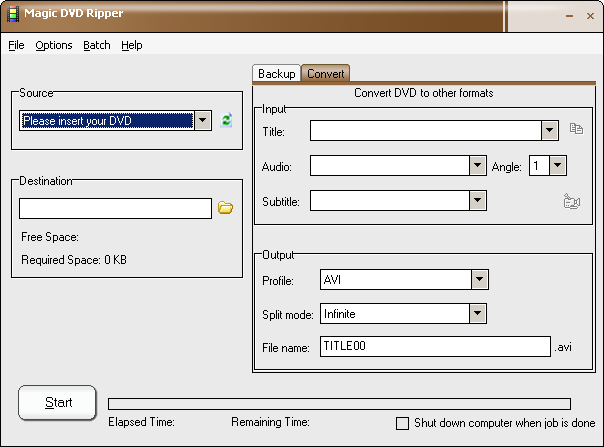
Magic DVD Ripper is a very easy and powerful DVD ripping software, which can convert DVD to VCD, SVCD, AVI (DivX), WMV, iPod and PSP formats or backup DVD to hard drive without any loss of quality. You can then enjoy them anytime without DVD discs or burn them to blank DVD or CD discs using burning software. It can copy protected DVD to hard drive with 4 optional mode (disc fully, main movie, split DVD-9 into DVD-5, files). With optimized for Intel CPU, Magic DVD Ripper provides fast ripping speed and wonderful output quality.

Compared with competitors, Magic DVD Ripper has both convert function and backup function combined with faster ripping speed. While other software may be unable to rip some certain DVDs or yield unsync audio/video, Magic DVD Ripper almost always functions perfectly. It supports batch converting and has many settings that you can customize. And it automatically detect DVD-ROM and select appropriate settings for beginner, so you can get started with just one click.

Key Features of Magic DVD Ripper:
* Convert DVD to Xvid, DivX or other AVI formats
* Convert DVD to WMV
* Convert DVD to MP4 (for iPod, iPad, PSP, PS3, smartphone or other mp4 player)
* Convert DVD to MPEG2
* Convert DVD to MP3
* Convert DVD to VCD or SVCD
* Copy DVD movie to hard drive without any loss of quality
* Remove all the restrictions of DVD (CSS, Region, RCE, Sony ARccOS, PuppetLock)
* Auto-update decryption files for protected DVDs
* Copy main movie only or split DVD-9 into 2 DVD-5
* Compress DVD to fit on a 4.7 GB disc
* Very easy to use, just by one click
* High ripping speed and wonderful output quality


Home Page - www.magicdvdripper.com